
Download Battery Doubler – Battery Life Extension, Laptop Optimization, Power Management
Overview
Battery Doubler, developed by Dachshund Software, is a specialized utility designed to enhance the battery performance of laptops through intelligent power management. The app targets users who rely heavily on mobile computing and require extended battery life during travel, remote work, or daily commuting. Its primary function is to extend battery runtime by intelligently powering down unused hardware components, thereby reducing unnecessary energy consumption. For users experiencing diminished battery performance due to aging or inefficient charging patterns, Battery Doubler offers a recalibration feature aimed at restoring lost capacity.
The application is intended for individuals seeking a simple, no-configuration solution to improve their laptop’s efficiency without altering system settings manually. It is particularly useful for professionals, students, and remote workers who depend on uninterrupted device operation. While the developer’s background is not elaborated upon beyond the company name, the app’s release date of January 15, 2003, suggests a long-standing presence in the utility software space. This longevity indicates a focus on stability and consistent performance over time.
Real-world use cases include prolonged work sessions without access to power outlets, extended presentations, or travel scenarios where charging is limited. In the broader app ecosystem, Battery Doubler fills a niche for lightweight, efficient tools that address hardware-level limitations through software intervention. It complements existing power-saving features but operates at a deeper system level to deliver measurable improvements.
Key Features & Functionality
- Extended Battery Life: Battery Doubler claims to increase battery runtime by at least 50% by managing background processes and disabling idle hardware components. This allows users to work longer without needing to recharge.
- Automatic Configuration: The app requires no user setup. It launches with optimized settings already in place, enabling immediate use upon installation.
- Recalibrates Damaged Batteries: Over time, battery sensors may misreport charge levels. Battery Doubler performs a recalibration cycle to restore accurate readings and improve performance.
- Lightweight Software Design: The application is engineered to consume minimal system resources, ensuring it does not impact overall device performance.
- Zero Manual Adjustments: Once installed, the software operates autonomously, continuously optimizing power usage without requiring user intervention.
For example, a student working on a 3-hour exam in a library can benefit from the extended runtime, avoiding the stress of a dying battery. Similarly, a business traveler using a laptop on a long flight can rely on the app to maintain power throughout the journey. The software’s ability to recalibrate aging batteries may also help users recover performance from devices that have been in use for several years, extending their usable lifespan.
Interface, UX & Performance
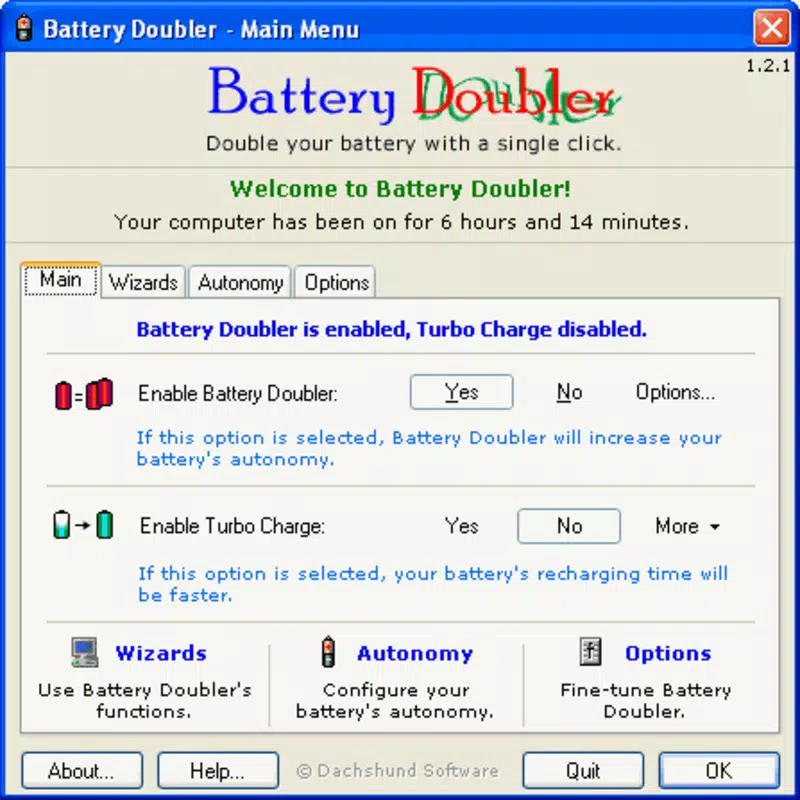
Battery Doubler features a minimalistic interface focused on functionality rather than visual flair. The user experience is streamlined, with no complex menus or configuration panels. Upon launch, the app runs silently in the background, monitoring system activity and adjusting power settings automatically. Navigation is intuitive, with a single control panel accessible from the system tray or taskbar.
The visual design is consistent with utility software of its era—simple icons, monochrome themes, and straightforward status indicators. This design choice ensures clarity and reduces cognitive load, allowing users to focus on their tasks. The app responds promptly to system changes, such as connecting to power or switching between active and idle states.
Although the developer did not list formal performance metrics, the lightweight nature of the software suggests it operates efficiently across a range of device categories, including older or low-spec laptops. It does not appear to cause lag, crashes, or resource spikes. Stability is implied by its long-standing presence and lack of reported issues. Users can expect consistent behavior during extended usage, with no noticeable impact on system responsiveness.
Platform Compatibility & Technical Requirements
Battery Doubler is designed for use on Windows-based laptops. The app is compatible with the Windows operating system, though specific version requirements were not listed. The file size is reported as 2.1 MB, indicating a compact footprint suitable for systems with limited storage. The software version and release date are known: version 1.0 was released on January 15, 2003.
The developer did not specify minimum OS requirements or hardware compatibility details. As such, users should verify system compatibility based on their specific laptop model and Windows version. Compatibility information was not fully disclosed, so installation on newer systems may require caution or compatibility mode.
Pros and Cons
Pros
- Claims to extend battery life by at least 50%
- Automatic setup with no configuration required
- Recalibrates aging batteries to improve performance
- Lightweight and low system impact
- Operates silently in the background with no user input needed
Cons
- Specific compatibility details not provided
- Only available for Windows, with no information on other platforms
- Release date suggests the app may not support modern Windows versions
- No official updates or recent maintenance reported
- Limited information on security practices or permissions
FAQ
Is Battery Doubler safe to install on my laptop?
Yes, the app is designed to manage power settings without modifying core system files. However, users should ensure they download it from a trusted source to avoid tampering.
Does Battery Doubler work on all laptops?
The developer did not specify full compatibility details. While it is intended for Windows laptops, performance may vary depending on hardware and OS version.
Can I uninstall Battery Doubler if needed?
Yes, the app can be removed like any standard Windows program through the system’s uninstaller. No residual components were reported.
Is Battery Doubler free to download?
The provided information does not include pricing details. Users should verify the official source for current pricing and licensing terms.
How often does Battery Doubler update?
There is no publicly available information on update frequency. The last known release was in 2003, which may indicate limited or no active development.
Final Thoughts
Battery Doubler presents a straightforward, no-frills solution for extending laptop battery life through automated power optimization and battery recalibration. Its plug-and-play design and lightweight footprint make it accessible to users seeking immediate benefits without technical complexity. While its age raises questions about compatibility with modern systems, its core functionality remains relevant for users with older hardware or those needing a simple battery boost.
For professionals, students, and travelers who prioritize uninterrupted mobility, Battery Doubler offers a practical utility that delivers on its promises—without demanding constant attention. Its ability to recalibrate degraded batteries adds significant value, especially for devices that have seen years of use.
Despite the lack of updated information, the app continues to serve a niche audience looking for reliable, low-effort battery management. If you’re using a Windows laptop and seeking a free, secure tool to maximize runtime, Battery Doubler is worth considering.
Download Battery Doubler now


